
Common Causes of Smartphone GPS and Location Tracking Problems
For users searching for phone repair regina sk, understanding the common causes of GPS and location problems can help determine whether the issue can be resolved through simple troubleshooting or requires professional attention. NanoTech can assist with various smartphone problems, including hardware and software-related issues that may affect everyday device performance.

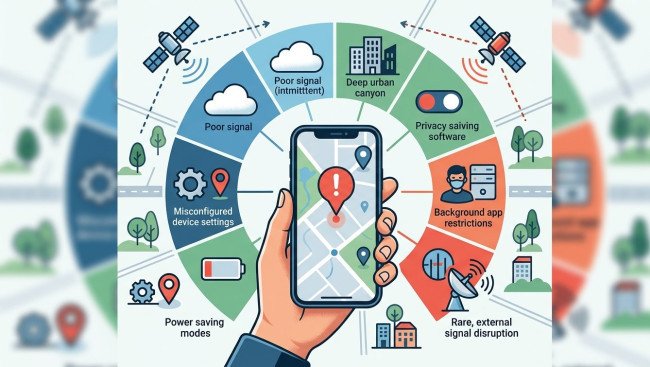
GPS and location services have become essential features of modern smartphones. People use them for navigation, ride-sharing, weather updates, fitness tracking, finding nearby businesses, sharing locations, and many other everyday tasks. When a smartphone suddenly shows an inaccurate location, struggles to find a GPS signal, or stops updating its position, it can make these features difficult to use.
Location problems do not always mean that the GPS hardware is damaged. Settings, permissions, poor signal conditions, software issues, battery-saving features, and physical damage can all affect location accuracy.
For users searching for phone repair regina sk, understanding the common causes of GPS and location problems can help determine whether the issue can be resolved through simple troubleshooting or requires professional attention. NanoTech can assist with various smartphone problems, including hardware and software-related issues that may affect everyday device performance.
Table of Contents
- How Smartphone GPS and Location Services Work
- Common Signs of GPS Problems
- Location Services Are Turned Off
- App Location Permissions
- Poor GPS Signal and Environmental Interference
- Weak Mobile or Wi-Fi Connectivity
- Battery-Saving and Power Management
- Incorrect Date, Time, or Device Settings
- Software Bugs and Outdated System Software
- App-Specific Location Problems
- Physical Damage and GPS Hardware Issues
- How to Troubleshoot Smartphone GPS Problems
- When to Seek Professional Phone Repair
- How Technicians Diagnose GPS Problems
- Tips for Maintaining Reliable Location Services
- FAQs
- Final Thoughts and CTA
How Smartphone GPS and Location Services Work
Smartphones generally use multiple technologies to determine your location rather than relying on GPS alone.
Depending on the device and situation, location services may use:
- GPS or satellite positioning.
- Wi-Fi networks.
- Cellular network information.
- Bluetooth signals.
- Device sensors.
- App-specific location systems.
GPS can provide highly useful positioning information outdoors, while Wi-Fi and cellular information can help improve location estimates in areas where satellite signals are weaker.
Because several systems can contribute to location information, a problem with any one of these systems may affect the overall experience.
Common Signs of GPS Problems
Location-related problems can appear in different ways.
You may notice:
- Your location appears several streets away.
- Navigation repeatedly loses your position.
- GPS takes a long time to find your location.
- Your location remains frozen.
- Maps show an incorrect direction.
- Fitness apps fail to track movement accurately.
- Location-based applications cannot determine your position.
- Location updates stop while traveling.
- The problem occurs across multiple applications.
Identifying when the problem happens can provide useful clues about its cause.
Location Services Are Turned Off
One of the simplest causes of location problems is that location services have been disabled.
Smartphones provide settings that allow users to turn location services on or off. Individual applications may also have separate permission settings.
If location services are disabled, applications that rely on your device's position may be unable to provide accurate information.
Check your phone's location settings and make sure location services are enabled if you want applications to use them.
App Location Permissions
Even when overall location services are enabled, an individual application may not have permission to access your location.
For example, a navigation application may require location access to provide turn-by-turn directions.
Check the application's permissions and review whether it is allowed to access location information.
Depending on the operating system and application, you may be able to choose between options such as allowing location access only while using the app or allowing access under other conditions.
If only one application has a location problem while other apps work normally, permission settings are worth checking first.
Poor GPS Signal and Environmental Interference
GPS performance can be affected by the surrounding environment.
Buildings, underground parking areas, tunnels, dense urban environments, and other physical obstructions can interfere with satellite signals.
You may experience less accurate positioning when:
- Inside large buildings.
- Underground.
- In enclosed parking areas.
- Surrounded by tall buildings.
- In locations with limited sky visibility.
If GPS works normally outdoors but struggles inside buildings, the issue may simply be related to signal conditions rather than a defective phone.
Move to an open outdoor area and allow the device some time to establish a stronger positioning signal.
Weak Mobile or Wi-Fi Connectivity
Although GPS itself does not require a traditional internet connection to determine satellite-based positioning, smartphones can combine GPS with network-based information to improve location performance.
Poor cellular or Wi-Fi connectivity may therefore affect how quickly some applications determine or update your position.
If navigation or location-based applications behave differently depending on your network connection, check your mobile data and Wi-Fi settings.
You can also test location services in an open area while connected to a reliable network.
Battery-Saving and Power Management
Battery-saving features can restrict background activity and certain device functions.
Depending on the smartphone and its settings, aggressive power-saving modes may limit how frequently applications can access or update location information.
This can be especially noticeable with:
- Navigation applications.
- Fitness trackers.
- Delivery applications.
- Ride-sharing services.
- Background location services.
If location updates become less frequent after enabling a battery-saving mode, review your power-management settings.
You may need to allow important applications to operate normally if you want continuous location updates.
Incorrect Date, Time, or Device Settings
Incorrect system settings can sometimes contribute to unexpected behavior across smartphone services.
Check that your device has the correct:
- Date.
- Time.
- Time zone.
- Region settings.
Using automatic date and time settings, when available, can help keep the device synchronized with network information.
You should also verify that location services and relevant permissions are configured correctly.
Software Bugs and Outdated System Software
Smartphone operating systems control many functions associated with location services.
Temporary software glitches can sometimes cause GPS or location applications to behave incorrectly.
A restart may clear a temporary problem. If the issue continues, check whether a system software update is available.
Updates may include bug fixes, performance improvements, security changes, and improvements to device functionality.
If the GPS problem started after a software or application update, monitor whether the issue affects one application or the entire device.
App-Specific Location Problems
Sometimes the smartphone's GPS is working correctly while a particular application is experiencing problems.
If navigation works normally but one fitness or weather application cannot determine your location, the issue may be related to that application.
Try:
- Closing and reopening the application.
- Checking its location permissions.
- Updating the application.
- Restarting the smartphone.
- Reinstalling the application if necessary.
Testing multiple applications is useful because it can help determine whether the problem is system-wide or limited to a single app.
Physical Damage and GPS Hardware Issues
If GPS problems begin after a significant drop, liquid exposure, or other physical damage, hardware may be involved.
A smartphone contains multiple internal components that work together to provide connectivity and location functionality. Damage to internal components or connections can affect device performance.
Potential warning signs include:
- GPS problems occurring in open outdoor areas.
- Location issues across multiple applications.
- Other connectivity problems appearing at the same time.
- Problems beginning immediately after a drop.
- Issues following liquid exposure.
- Persistent location inaccuracies despite correct settings.
When several functions become unreliable at the same time, professional diagnosis can help determine whether hardware damage is involved.
How to Troubleshoot Smartphone GPS Problems
Before seeking professional repair, try these basic troubleshooting steps.
1. Check Location Services
Make sure location services are enabled.
2. Review App Permissions
Confirm that the affected application has appropriate location access.
3. Move Outdoors
Test GPS performance in an open area with a clear view of the sky.
4. Restart Your Smartphone
A restart can resolve temporary software issues affecting location services.
5. Check Battery-Saving Features
Temporarily disable aggressive power-saving modes and test location performance again.
6. Update Your Software
Install available operating system and application updates.
7. Test Multiple Apps
Use more than one location-based application to determine whether the issue affects the whole device.
8. Check Connectivity
Make sure cellular data or Wi-Fi is functioning properly when the affected application requires network connectivity.
9. Remove Interfering Accessories
If you recently added a new case or accessory, temporarily remove it and test the device again.
These steps can help narrow down the source of the problem without immediately assuming that the phone requires hardware repair.
When to Seek Professional Phone Repair
Professional inspection may be appropriate when GPS problems continue despite normal troubleshooting.
Consider seeking assistance if:
- GPS consistently shows an incorrect location outdoors.
- Multiple location-based applications have the same problem.
- The device repeatedly loses its location signal.
- Location problems started after physical damage.
- The phone has experienced liquid exposure.
- Other connectivity functions are also failing.
- Location services remain unreliable after software troubleshooting.
If you are searching for samsung phone repair regina sk, a professional technician can inspect the device and determine whether the problem appears to be related to software, settings, connectivity, or hardware.
For users looking for cell phone repair regina sk, professional diagnostics can be particularly helpful when a location problem occurs alongside other unexplained smartphone issues.
How Technicians Diagnose GPS Problems
GPS problems can have several possible causes, so proper diagnosis is important.
A technician may review:
- Location settings.
- Application permissions.
- Software behavior.
- Network connectivity.
- Device history.
- Physical condition.
- Signs of liquid or impact damage.
- Other connectivity functions.
The exact diagnostic process varies depending on the smartphone model and symptoms.
Rather than immediately replacing a component, a proper diagnosis can help determine whether the issue actually requires hardware repair.
Tips for Maintaining Reliable Location Services
You can take several simple steps to keep location-based features working reliably.
Keep Software Updated
Install supported operating system and application updates.
Review Permissions
Periodically check which applications have access to your location.
Protect Your Device
Use a suitable protective case and avoid exposing the phone to unnecessary impacts or moisture.
Avoid Excessive Heat
High temperatures can affect overall smartphone performance and may cause temporary limitations.
Monitor Battery Settings
Make sure power-saving settings are not unnecessarily restricting important location applications.
Test GPS Periodically
If you regularly depend on navigation or location tracking, testing the feature occasionally can help you notice changes early.
FAQs
1. Why is my smartphone showing the wrong location?
Incorrect location information can result from weak GPS signals, disabled location services, inaccurate permissions, poor network connectivity, software issues, or potential hardware problems.
2. Why does GPS work outside but not inside?
Buildings, walls, underground areas, and other physical structures can weaken or obstruct satellite signals. GPS generally performs better in open outdoor environments.
3. Can battery saver affect GPS?
Battery-saving features may restrict background activity or how frequently applications access location information. Check your power-management settings if location updates become less frequent.
4. Why does only one app have GPS problems?
If other location-based applications work correctly, the issue may be related to the affected application's permissions, settings, software, or data.
5. Can a phone drop damage GPS?
A significant impact can potentially damage internal components or connections, which may affect GPS or other connectivity functions.
6. Can software updates fix GPS problems?
Software updates may resolve certain bugs or compatibility problems. However, software updates cannot repair physical damage to internal hardware.
7. Should I reset my phone if GPS is not working?
A complete factory reset should generally not be the first troubleshooting step. Try checking permissions, restarting the phone, updating software, and testing GPS outdoors first. Back up important data before considering more extensive troubleshooting.
8. When should I get professional help for GPS problems?
If GPS remains inaccurate across multiple applications and open outdoor locations, particularly after a drop or liquid exposure, professional diagnostics may help identify the cause.
Final Thoughts
Smartphone GPS and location tracking problems can be caused by something as simple as disabled location services or incorrect application permissions. Environmental conditions, weak connectivity, battery-saving features, software issues, and application problems can also affect location accuracy.
Start by checking your location settings, reviewing app permissions, restarting the device, testing GPS outdoors, and ensuring that software is up to date. If the problem continues across multiple applications, especially after physical or liquid damage, professional diagnosis may be appropriate.
NanoTech can assist smartphone users with device-related issues that affect everyday performance. Whether you are searching for phone repair regina sk, samsung phone repair regina sk, or cell phone repair regina sk, identifying the underlying cause of a GPS problem is an important first step toward finding the right solution.
Need Help With a Smartphone Location Problem?
If your smartphone consistently loses GPS signal, shows an inaccurate location, or experiences other connectivity problems, consider having the device professionally inspected. Contact NanoTech for assistance with smartphone diagnostics, hardware concerns, connectivity issues, and other repair needs.












Comments
0 comment