
How to implement a chatbot solution
Learn how to implement a chatbot solution that streamlines business operations with step-by-step guidance. Explore ai chatbot development services, custom chatbot development, and practical strategies to optimize performance.

How to implement a chatbot solution
A chatbot solution works best when it is treated as a business system, not just a chat window. To implement one successfully, you need to define the job it should do, design useful conversation flows, connect it to the right data, test it carefully, and keep improving it after launch. This guide walks through the practical steps for planning, building, deploying, and optimizing a chatbot that supports customers, employees, sales teams, or service operations.
What do you need before you start?
Before you start, you need a clear use case, a defined audience, access to the information the chatbot will use, and a realistic plan for handoff to humans when automation is not enough. A chatbot can answer common questions, qualify leads, book appointments, collect support details, or guide users through a process, but it should not be expected to solve every problem on day one. The strongest implementations begin with a narrow, valuable task and expand once the team has real performance data.
Use this preparation checklist before choosing a platform or starting Custom chatbot development:
-
Primary goal: Decide whether the chatbot should reduce repetitive support work, increase conversions, improve onboarding, collect information, or help users find answers faster.
-
Audience: Identify who will use it, such as website visitors, existing customers, internal employees, or sales prospects.
-
Channels: Choose where it should appear, including your website, mobile app, customer portal, messaging apps, or internal tools.
-
Knowledge sources: Gather FAQs, product documentation, policies, service pages, knowledge base articles, forms, scripts, and other approved materials.
-
Escalation path: Define when the chatbot should transfer the conversation to a person, create a ticket, schedule a call, or collect contact details.
-
Success metrics: Choose practical measures such as completed conversations, lead quality, containment rate, customer satisfaction, response time, or task completion.
-
Compliance requirements: Note any privacy, security, legal, or industry-specific rules that affect how the chatbot stores and uses information.
1. Define the business outcome first
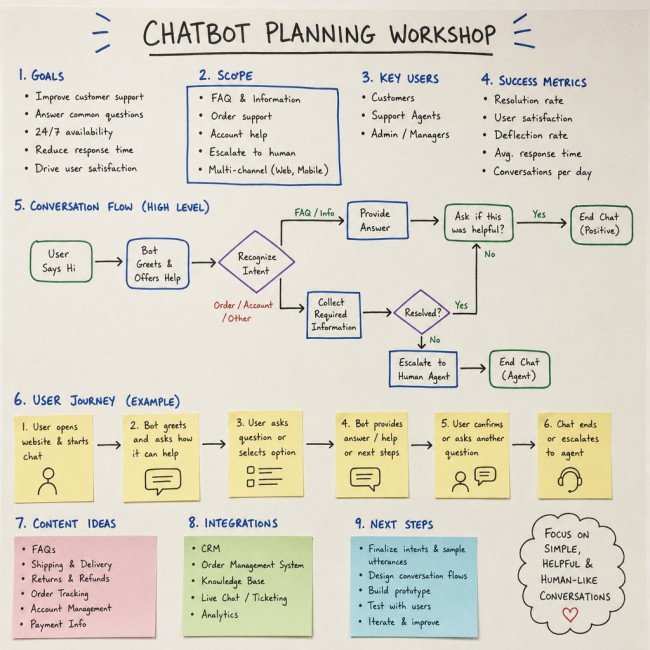
Start by writing a simple statement of what the chatbot must help users accomplish. For example, a support chatbot might help customers troubleshoot account access, while a sales chatbot might qualify visitors and route high-intent leads to the right team. This outcome should be specific enough that everyone can tell whether the chatbot is doing its job.
Avoid starting with technology choices too early. If the goal is vague, even advanced ai chatbot development services will struggle to produce a useful result because the assistant will not have a clear role. A focused objective helps you decide what content to prepare, what integrations are necessary, what tone the chatbot should use, and which metrics matter after launch.
A good starting goal usually has three parts: the user’s task, the business benefit, and the point where automation should stop. For instance, “Help website visitors compare service options, collect project details, and send qualified inquiries to the sales team” is much stronger than “Add a chatbot to the website.”
2. Map the user journey
Once the outcome is clear, map the steps a user takes before, during, and after the chatbot interaction. Think about the questions users arrive with, the information they may already have, and the action they expect to complete. This prevents the chatbot from becoming a disconnected feature that gives answers but does not move the user forward.
Create a simple journey map with entry points, conversation paths, decision points, and end states. Entry points may include a pricing page, support page, checkout screen, onboarding email, or logged-in dashboard. End states might include an answer delivered, a ticket created, an appointment booked, a document shared, or a human agent notified.
Pay special attention to moments of uncertainty. Users often need help when they are comparing options, stuck in a process, unsure which policy applies, or worried about making the wrong choice. These are high-value moments for a chatbot because fast guidance can reduce friction and keep the user engaged.
3. Choose the right chatbot type
Not every chatbot needs the same level of complexity. Some teams need a structured assistant with buttons and predefined flows, while others need a conversational AI assistant that can interpret open-ended questions. The right choice depends on the task, the risk level, the content available, and the experience you want to deliver.
If your needs are simple, a no-code or low-code tool may be enough. If the chatbot must connect to internal systems, follow complex logic, reflect a specialized brand experience, or support sensitive workflows, Custom chatbot development may be the better path. Many organizations also work with chatbot development services when they need strategy, conversation design, integrations, deployment support, and ongoing optimization in one process.
How do you choose between a platform and custom development?
Choose a platform when your requirements are standard, your workflows are simple, and speed matters more than deep customization. Choose custom development when the chatbot needs unique logic, secure system integrations, advanced permissions, multilingual flows, or a highly tailored user experience. The decision is less about which option is “better” and more about how closely the chatbot must fit your operations.
A platform can be effective for basic lead capture, FAQ automation, appointment prompts, and internal knowledge access. It usually gives you faster setup, built-in templates, analytics, and common integrations. However, it may become restrictive if your conversation paths depend on complex business rules or if your team needs control over data handling, interface behavior, or backend workflows.
Custom development gives you more flexibility but requires sharper planning. You need to define requirements, prepare data, design integrations, test edge cases, and maintain the system over time. If you are evaluating ai chatbot development services, ask how the provider handles discovery, data preparation, model behavior, fallback responses, security, human handoff, and post-launch improvement.
4. Prepare and organize your knowledge sources
A chatbot is only as helpful as the information it can access. Before building conversation flows, collect the content the chatbot is allowed to use and remove outdated, duplicated, or conflicting material. If your source content is messy, the chatbot may give unclear answers even if the underlying technology is strong.
Start with the materials users already depend on: FAQs, service descriptions, product details, help articles, policy pages, onboarding guides, troubleshooting instructions, and sales scripts. Then organize them by topic, audience, and level of detail. For example, a customer support chatbot may need separate knowledge groups for billing, account setup, returns, technical issues, and escalation policies.
Also decide what the chatbot should not answer. Some topics may require a human expert, formal review, or secure authentication. Create a list of restricted topics, approved response boundaries, and fallback language so the assistant can be helpful without overstepping.
5. Design the conversation flow
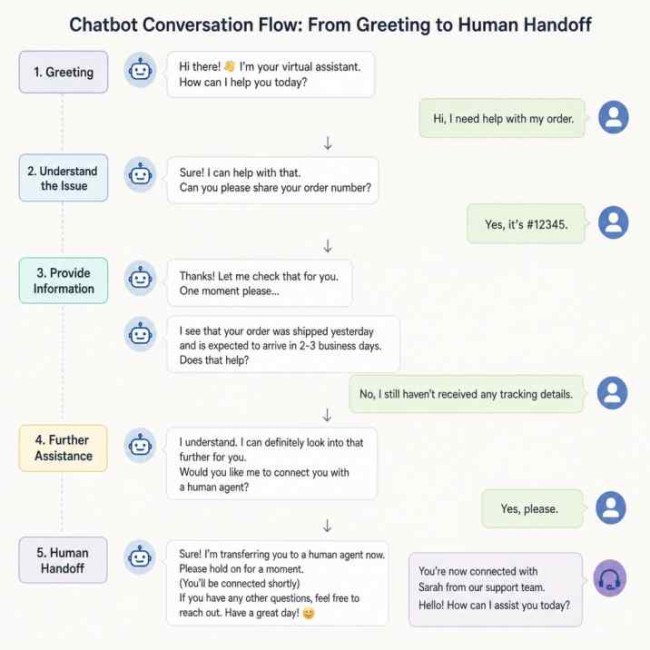
Conversation design turns your goals and content into an interaction that feels useful. Begin with the most common user intents, then write the ideal path for each one. An intent is the user’s reason for starting the conversation, such as “track my order,” “request a quote,” “reset my password,” or “compare service plans.”
For each intent, define what the chatbot should ask, what it should answer, what data it should collect, and what the final outcome should be. Keep prompts short and clear. A chatbot that asks five questions at once can overwhelm users, while one that asks one purposeful question at a time usually creates a smoother experience.
A practical conversation flow includes:
-
Greeting and expectation setting: Tell users what the chatbot can help with.
-
Intent recognition: Let users choose an option or describe their need naturally.
-
Clarifying questions: Ask only for details needed to complete the task.
-
Answer or action: Provide the response, trigger the workflow, or collect the request.
-
Confirmation: Repeat key details before submitting forms, tickets, or bookings.
-
Escalation option: Offer a human handoff when confidence is low or the issue is sensitive.
-
Closing message: Explain what happens next and provide a clear final action.
Write in a tone that matches your brand, but prioritize clarity over personality. A friendly chatbot still needs to be direct, accurate, and easy to follow.
6. Select integrations and data connections
Integrations turn a chatbot from a basic answer tool into a functional assistant. Depending on the use case, the chatbot may need to connect with a CRM, help desk, booking calendar, ecommerce system, payment status tool, knowledge base, authentication system, or internal database. Each connection should have a specific purpose tied to the user journey.
Do not integrate everything at once. Begin with the systems required for the first launch goal. For a lead generation chatbot, that might mean a CRM and email notification workflow. For a support chatbot, it might mean a ticketing platform and knowledge base. For an internal HR chatbot, it might mean policy documents and an employee portal.
During planning, define what data the chatbot can read, what data it can write, and when human approval is needed. For example, it may be acceptable for a chatbot to check appointment availability, but not to change an account status without verification. Clear permissions reduce risk and make testing easier.
7. Build a minimum viable chatbot
A minimum viable chatbot includes enough functionality to solve a real problem without trying to automate every possible conversation. Build the first version around your highest-value intents, cleanest content, and simplest handoff process. This approach helps you launch faster, learn from real usage, and avoid wasting effort on features users may not need.
For the first release, choose a small set of use cases and complete them well. A support bot might start with account access, billing questions, and ticket creation. A sales bot might start with service matching, qualification questions, and meeting requests. An internal chatbot might start with policy lookup and common IT requests.
Your first version should include clear fallbacks. If the chatbot does not understand the user, it should ask a clarifying question, suggest common options, or offer a human handoff. A graceful fallback is better than a confident but irrelevant answer.
8. Add safeguards and compliance controls
Chatbot safeguards protect users, your business, and the quality of the experience. These controls are especially important when the chatbot handles personal information, account details, regulated topics, or advice that could affect user decisions. Even simple chatbots should have basic privacy and escalation rules.
Start with data minimization. Only ask for information needed to complete the task. If the chatbot collects names, emails, order numbers, or account details, explain why the information is needed and route it through approved systems. Avoid collecting sensitive information unless your process, security controls, and policies support it.
Then define response boundaries. The chatbot should know when to say it cannot help, when to provide general information, and when to escalate. For AI-powered assistants, also test for unsupported claims, outdated source material, prompt misuse, and answers that sound plausible but are not grounded in approved content.
A basic safeguard checklist includes:
-
Use approved knowledge sources only.
-
Set rules for sensitive or restricted topics.
-
Provide human handoff for urgent, complex, or high-risk issues.
-
Log conversations in line with your privacy policy.
-
Limit access to conversation data based on team roles.
-
Review and update content when policies, products, or processes change.
-
Tell users when they are interacting with an automated assistant.
9. Test the chatbot with real scenarios
Testing should cover more than whether the chatbot “works.” You need to know whether it understands common requests, gives accurate answers, handles confusing inputs, and helps users reach the right outcome. Build a test plan from real customer questions, support tickets, search queries, sales calls, and internal requests.
Test straightforward paths first. Confirm that the chatbot can answer the most common questions, collect required fields, trigger integrations, and complete handoffs. Then test messy inputs: misspellings, incomplete questions, multiple questions in one message, frustrated language, unusual phrasing, and requests outside the chatbot’s scope.
Include people who were not involved in building the chatbot. Fresh testers are more likely to behave like real users and expose unclear wording, missing options, and assumptions in the flow. Ask them to note where they felt stuck, where the answer was too long, and where they expected a different next step.
10. Launch in phases
A phased launch gives you more control than releasing the chatbot everywhere at once. Start with one channel, one audience segment, or one section of your site. This makes it easier to monitor conversations, catch problems, and improve the assistant before broader deployment.
For example, you might begin on the support page instead of the whole website. Or you might release the chatbot to internal employees before making it customer-facing. If the assistant performs well, you can expand to more pages, languages, products, or workflows.
During launch, make sure users have a visible way to reach a person or submit a request if the chatbot cannot help. Also let your internal teams know what the chatbot can do, what it cannot do, and how escalations will arrive. A chatbot implementation affects support, sales, marketing, operations, and IT, so coordination matters.
11. Measure performance and improve continuously
After launch, review chatbot data on a regular schedule. Look for patterns in unanswered questions, repeated fallbacks, abandoned conversations, and successful completions. These patterns show where your content, flow, or integrations need improvement.
Useful metrics may include:
-
Conversation completion rate: How often users reach the intended outcome.
-
Fallback rate: How often the chatbot does not understand or cannot answer.
-
Escalation rate: How often conversations are handed to a human.
-
Lead quality: Whether chatbot-generated leads contain the right details and intent.
-
Resolution quality: Whether support users get useful answers without repeated contact.












Comments
0 comment